# Connection Types
{% content-ref url="towing-vehicle-setup" %}
[towing-vehicle-setup](https://distubredone322.gitbook.io/custom-vehicle-controller/guides/trailer-system/towing-vehicle-setup)
{% endcontent-ref %}
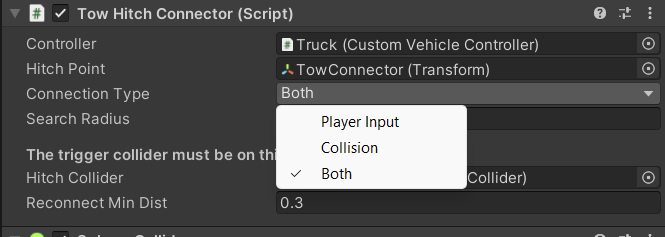
A hitch connector has 2 possible ways to connect.
1. Using player input
2. Using collisions
You can select any or both of the methods on the component itself.
### Player Input
Player Input relies on a single property - "SearchRadius".
Search radius defines two things:
1. The radius of the OverlapSphere. Upon user action, the hitch (if unconnected), will try to find the TrailerController the radius around it.
2. The maximum possible distance between this hitch and the coupler on the trailer for a viable connection.
Meaning, for a successful connection, the hitch must find a TrailerController near self and it's coupler must be close enough.
{% hint style="info" %}
The user action for connecting a trailer is handled like a toggle for a connection - try connect if not connected / disconnect if connected
{% endhint %}
### Collision
If the connection type is set to "Collision" or "Both", the connection will occur automatically upon collision with a TrailerController.
{% hint style="info" %}
"SearchRadius" is still used to make sure the hitch and coupler are near each other.
{% endhint %}
The tow hitch connector doesn't have a way to disconnect from the trailer. However, it has a condition for a new connection.
After disconnecting from the trailer, another connection becomes possible only after gaining "Reconnect Min Dist" distance from the last trailer's coupler point.
{% hint style="info" %}
Similar to the "SearchRadius", the size of the collider it this case influeces the chances of connection. For sphere collider, you can (and probably should) set the radius to the same value.
{% endhint %}